
NEXI Customer Vault feature enables you to offer your customers a seamless checkout experience. With this feature, customers can securely save their cards for future transactions, making repeat purchases faster and easier thereby improving conversion.
Merchants who are integrated to NEXI Paygate via Hosted Payment Page or Hosted Forms can enable NEXI Customer Vault feature to store buyer's card information on Paygate's secured and compliant infrastructure.
When your customers pay on the card form, they will have the option to save their card details. Saved cards will be available for future purchases with your shop, allowing customers to:
-
Select from their saved cards during checkout.
-
Remove cards at any time.
Get Started
-
Contact NEXI Helpdesk to activate this feature, if you are integrated via Hosted Payment Page or Hosted Forms.
-
Once activated, you have to submit the
merchantCustomerIdin your payment request:{ "customerInfo": { "merchantCustomerId": "cus_1234567890abcdef", "firstName": "Max", "lastName": "Mustermann", "email": "customer@example.com", "phone": { "countryCode": "+49", "number": "1236547890" } } }
Payment flow user experience
Registering new customer
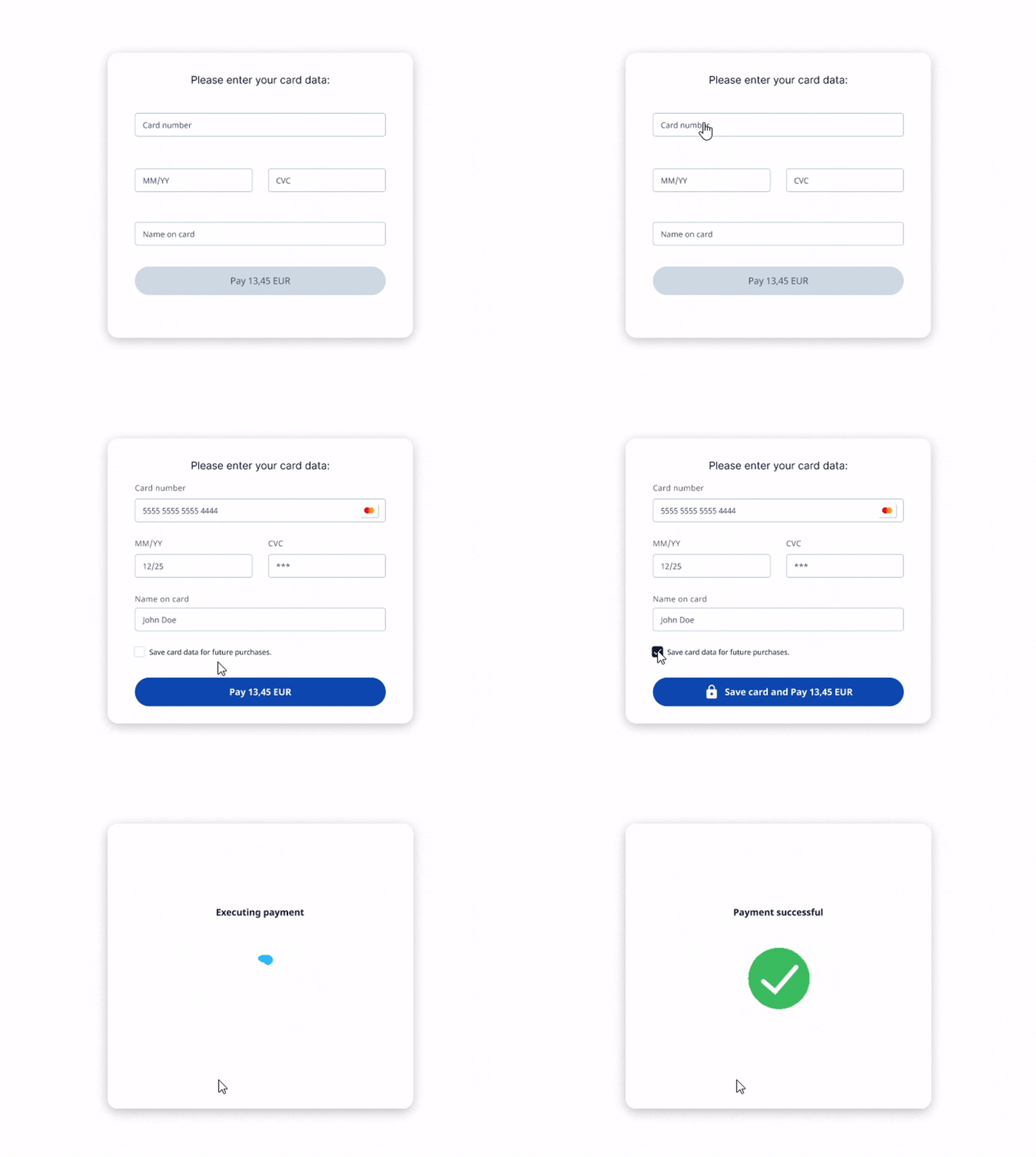
Once the feature is activated for your merchant profile and you have passed the merchantCustomerId in the request then the customers see an additional consent checkbox to saved their cards for future purchase. If the customer gives their consent, the customer data and the card details are saved in Nexi Paygate.
Returning customer
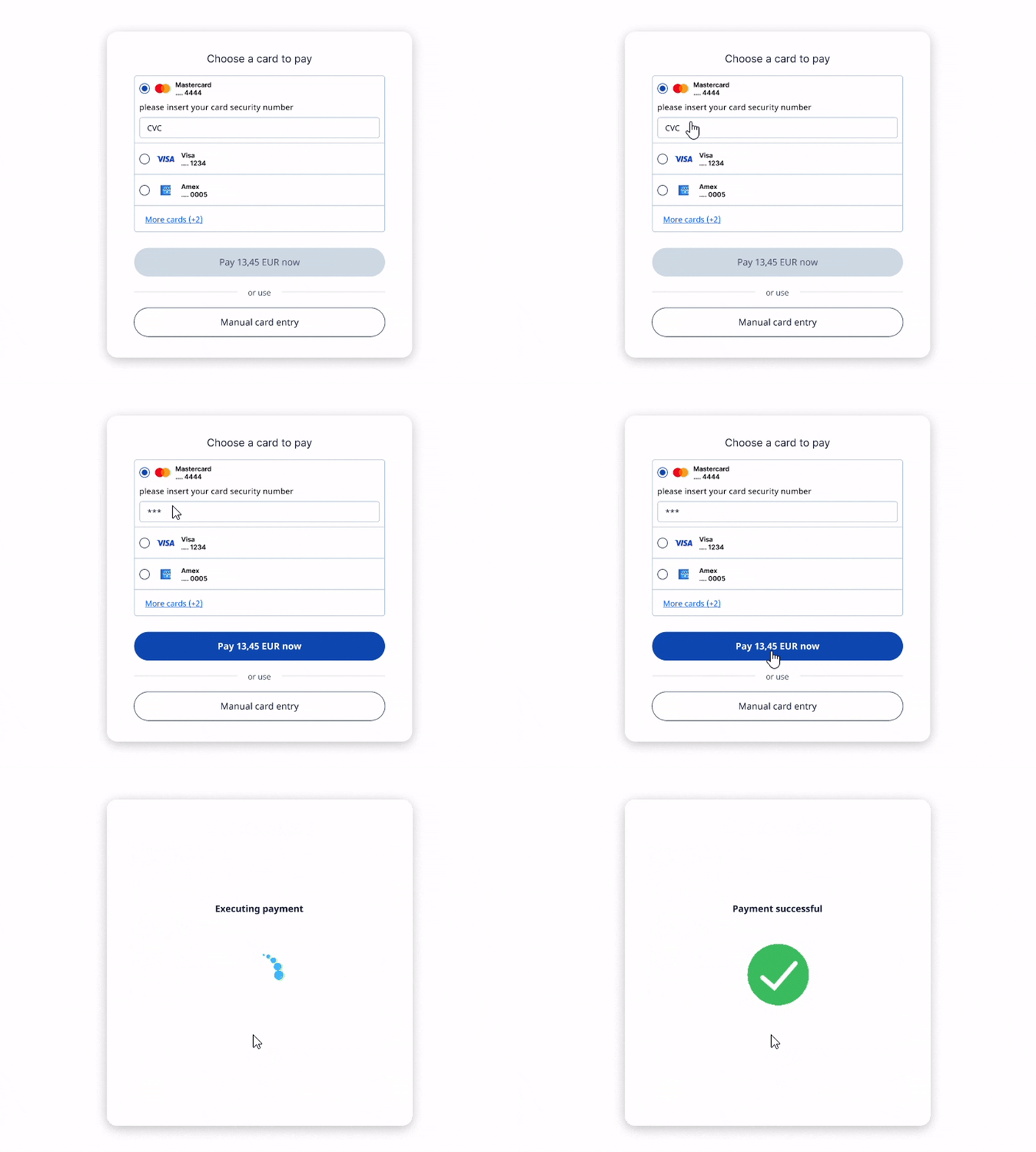
Returning customers (identified by the merchantCustomerId sent in the payment request) view all their saved cards to select from and pay faster.
Managing customers
For every saved customer NEXI Paygate stores a Customer object and payment method object for each card. One customer can have many payment method objects linked if the customer has stored multiple cards. You can view and manage customer data via NEXI UI or programmatically via our REST API.
Merchant portal UI
A new Customers section is available in the Merchant portal. Here you can:
-
View a list of all customers
-
View individual customer details
-
See all cards saved by each customer
-
Update customer details
-
Delete a customer (also deletes their payment methods)
-
Delete a specific payment method.
This gives you full control over customer and payment method records.
REST API
All customer and payment method management actions are also available via our REST API. This allows you to build your own UI or integrate the functionality into your systems.
Available endpoints
-
Customers
-
GET /customers– Retrieve a list of customers. -
GET /customers/{id}– Retrieve details of a specific customer. -
PATCH /customers/{id}– Update customer details. -
DELETE /customers/{id}– Delete a customer and all associated payment methods.
-
-
Payment methods
-
GET /customers/{id}/paymentMethods– List all payment methods for a customer. -
GET /customers/{customerId}/paymentMethods/{paymentMethodId}– Retrieve details of a specific payment method. -
DELETE /customers/{customerId}/paymentMethods/{paymentMethodId}– Delete a specific payment method.
-
Webhook notifications
Everytime a new customer or a payment method is added in NEXI Paygate during the payment processing, the information is sent to urls.webhook submitted in the payment request and Customer Vault specific webhook notification endpoint configured for your merchant profile.
Webhook URL
A new parameter vaultInteraction is sent to the urls.webhook once the payment is completed, informing you about customer's interaction with the Customer Vault on the card form.
Possible values:
|
Value |
Description |
|---|---|
|
PAYMENT_METHOD_ADDED |
When a new card is added for a new customer or an existing customer profile. |
|
PAYMENT_METHOD_USED |
When an existing saved card was used for payment. |
|
NONE |
Customer doesn't have a vault or an existing customer has paid with a new card but did not save it. |
Customer vault webhook notification
The notification sent to Customer vault webhook notification endpoint is the exhaustive information about the payment method data saved in NEXI. The information sent is based on type of action the customer performed on the form.
Save a new card
Parameter description
|
Parameter |
Type |
CND |
Description |
|---|---|---|---|
|
gatewayCustomerId |
string (32) |
M |
Unique identifer of the customer assigned by Paygate |
|
merchantCustomerId |
string (64) |
M |
Unique identifer of the customer assigned by merchant |
|
merchantId |
string |
M |
Merchant ID |
|
scope |
string |
M |
Scope of the customer vault configured at merchant level |
|
paymentMethod.action |
enum |
M |
Describes whether the card was created or deleted. For saving a new card the value is "create" |
|
string (32) |
M |
Unique ID assigned by NEXI for the payment method record |
|
|
paymentMethod.type |
enum |
M |
Determines type of payment method. Possible values: card |
|
paymentMethod.last4Digits |
string (4) |
M |
Last 4 digits of the card |
|
paymentMethod.pseudoCardNumber |
number (16) |
C |
Pseudo card number |
|
paymentMethod.cardHolderName |
string |
M |
Cardholder name |
|
paymentMethod.brand |
string |
M |
Type of card brand (Visa, Mastercard, etc.) |
|
paymentMethod.expiryDate |
number (6) |
M |
Expiry date of the card |
|
paymentMethod.createdAt |
datetimestamp |
M |
Creation date of payment method record |
|
paymentMethod.updatedAt |
datetimestamp |
M |
Last updated date of the payment method record |
|
paymentMethod.lastUsedAt |
datetimestamp |
M |
Last used date of the payment method record |
Sample
{
	"gatewayCustomerId": "cu_841b9b1a99fc4f0",
	"merchantCustomerId": "1234567890",
	"merchantId": "demo_store_ecom",
	"scope": "demo_parent",
	"paymentMethod": {
		"action": "create",
		"id": "pm_5555b1a99fe4tg3",
		"type": "card"
		"last4Digits": "4242",
		"pseudoCardNumber": "0132332232424242"
		"name": "Max Mustermann",
		"brand": "visa",
		"expiryDate": "202506",
		"createdAt": "2023-12-21T12:10:58.087",
		"updatedAt": "2023-12-21T12:10:58.087",
		"lastUsedAt": "2023-12-21T12:10:58.087",
	}
}
Delete an existing card
This notification is sent when the customer is deleting the card from the payment form.
Parameter description
|
Parameter |
Type |
CND |
Description |
|---|---|---|---|
|
gatewayCustomerId |
string (32) |
M |
Unique identifer of the customer assigned by Paygate |
|
merchantCustomerId |
string (64) |
M |
Unique identifer of the customer assigned by merchant |
|
merchantId |
string |
M |
Merchant ID |
|
scope |
string |
M |
Scope of the customer vault configured at merchant level |
|
paymentMethod.action |
enum |
M |
Describes whether the card was created or deleted. For deleting an existing card the value is "delete". |
|
string (32) |
M |
Unique ID assigned by Paygate for the payment method record |
|
|
paymentMethod.type |
enum |
M |
Determines type of payment method. Possible values: card |
Sample
{
	"gatewayCustomerId": "cu_841b9b1a99fc4f0",
	"merchantCustomerId": "1234567890",
	"merchantId": "demo_store_ecom",
	"scope": "demo_parent",
	"paymentMethod": {
		"action": "delete",
		"id": "pm_5555b1a99fe4tg3",
		"type": "card"
	}
}