
Sensitive card data
PCI DSS requires that every user access to sensitive credit card data must be able to be retraced for security reasons. The application therefore does not save each action by the user, but rather only the actions relevant to security, such as data access.
The tab "Administration → User log" allows you to search for user actions relevant to security within the application. This allows you to set filters within the application for the period, the user, and the user action relevant to security. You can export the search results as an Excel file.
If you wish to grant several persons access to the application, you can create new users in the user management.
Overview of the search criteria
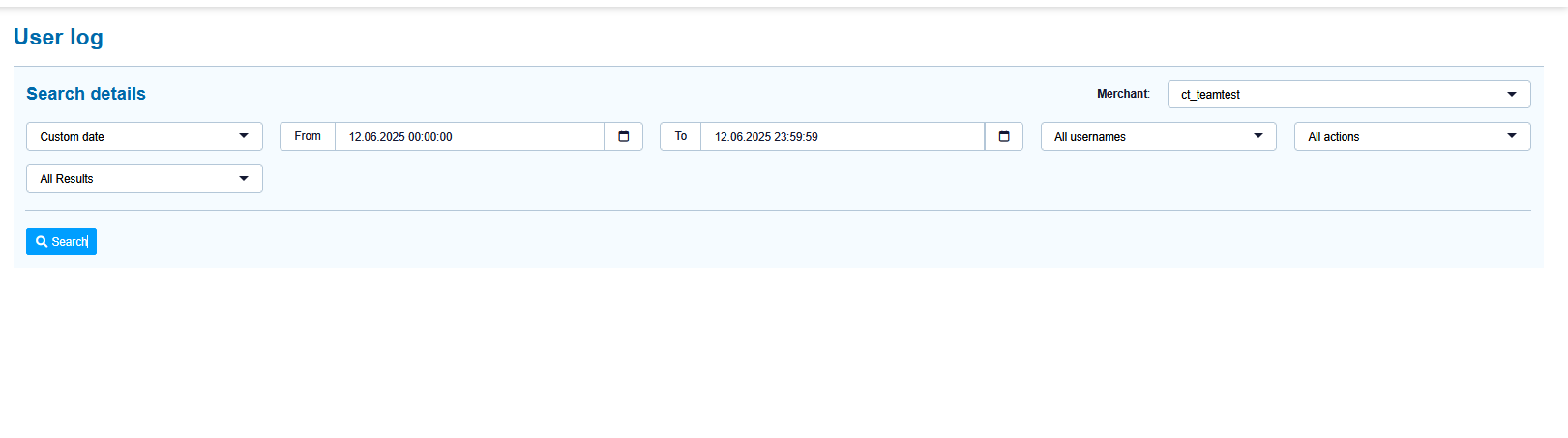
"Period" selection field
"All Actions" selection field
"All usernames" selection field
"All Results" selection field
"Search and Filter" button
Activating the "Period" selection field
When you click in the input fields for the date, a calendar opens in which you can select a date. When you click in the input fields for the time, you can define a time for the search.
Selecting users
You can either select all users, or a specific user.
Selecting an action
Every action relevant to security carried out by a user is saved. Descriptions of the individual types of actions relevant to security can be found in the "Actions relevant to security" table below.
Activating the "All results" selection field
You can select two different results: Successful or failed depending on the action selected.
|
Action |
Description |
|---|---|
|
Cancel |
Payment cancelled |
|
Capture |
Capture added to an operation |
|
Credit |
Credit added to an operation |
|
Delete PR related data |
Information removed |
|
Login |
User logged in |
|
Logout |
User logged out |
|
Re-Authorization |
Manual Authorization created |
|
Re-debiting process |
Manual debit created |
|
Reversal |
Payment reversal |
|
User management |
User Management operation |